

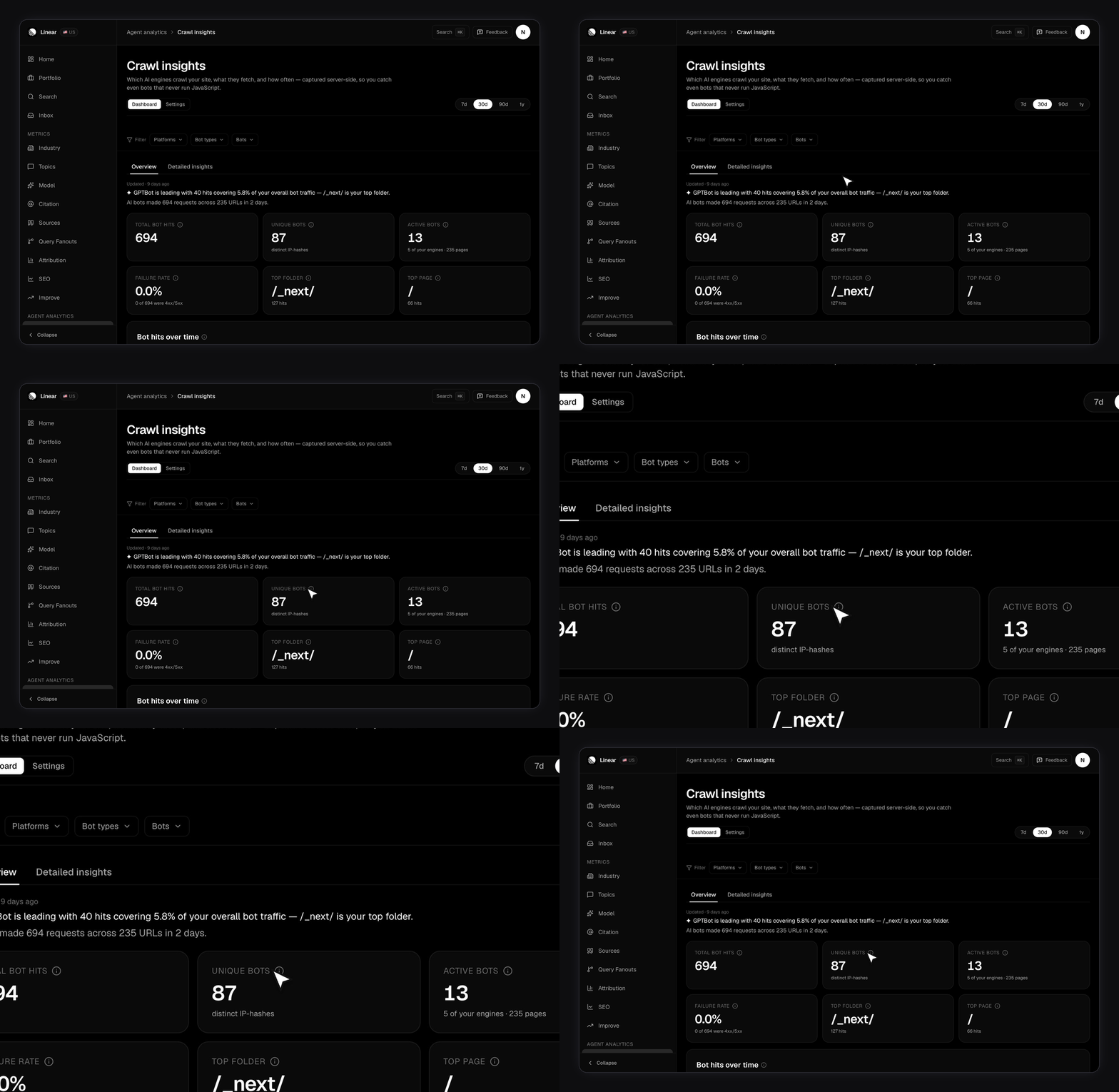
Why can’t normal analytics see this?
Because GPTBot, ClaudeBot, and the other training crawlers don’t run JavaScript. Tag-based tools record only visitors that execute a script, so those crawlers are invisible to them. That includes Google Analytics, which sees the humans AI sends you but never the bots. Reading requests at the server or edge is the only way to catch them. That’s the split FixAEO uses:
It’s one method per plan, on purpose. On Growth and Enterprise the tag’s data is ignored, so a leftover tag can’t double count against your server logs.
What does it tell you?
A KPI strip across the top:- Total bot hits, with a daily trend chart
- Unique bots, counted as distinct hashed IPs
- Active bots and Engines seen
- Failure rate, the share of crawls that returned a 4xx or 5xx
- Top folder and Top page, the paths bots fetch most
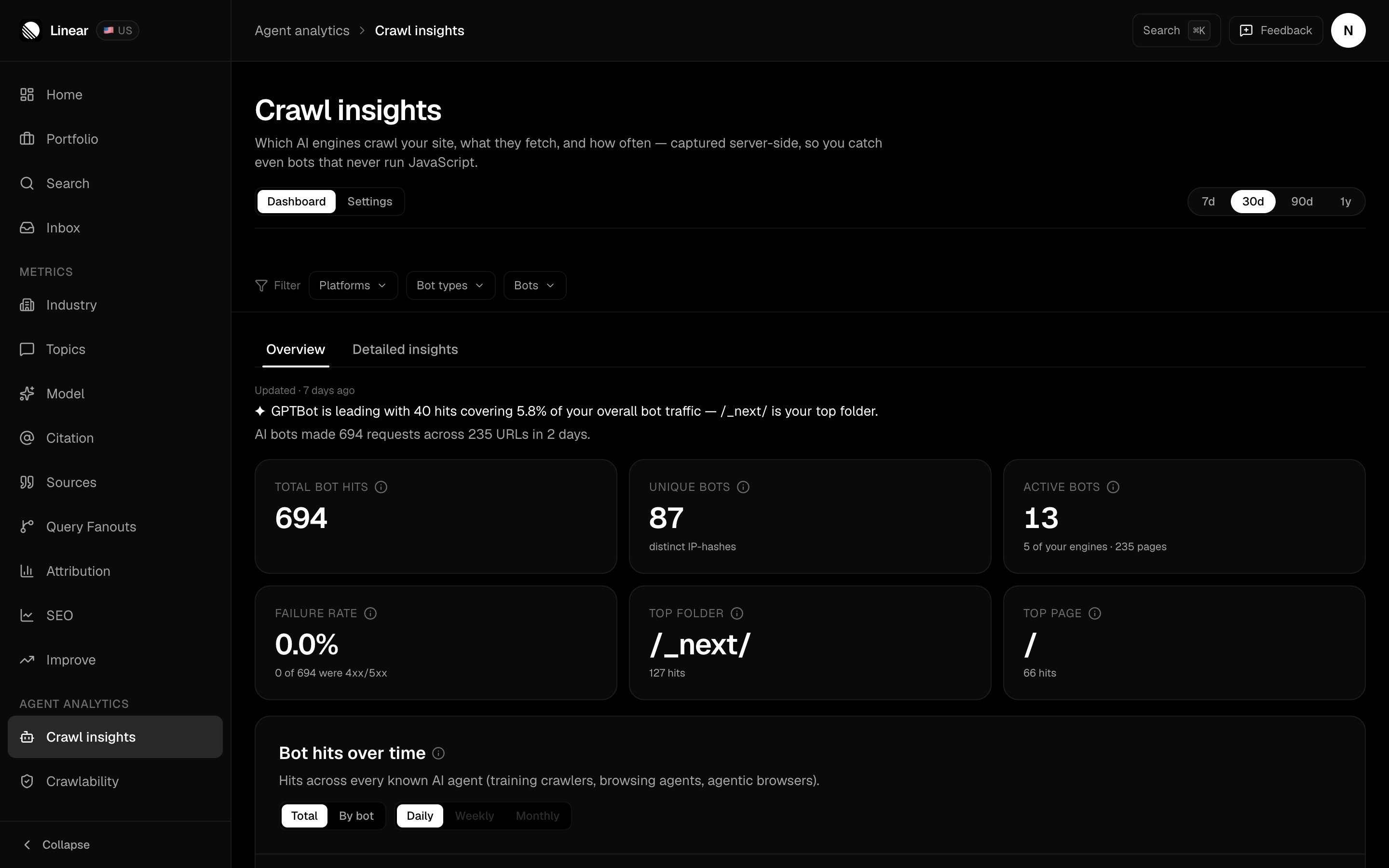
The line above the tiles calls out the leading bot for the range — GPTBot here, at 40 hits and 5.8% of all bot traffic.
- Bot hits over time, with a Total or By bot toggle. Total folds every crawler into one line; By bot stacks the top ones. On ranges of 7 days or less you can switch to hourly buckets.
- Content — two ranked lists side by side, by folder and by URL.
- Crawl breakdown — by platform, by bot, and by type. A fourth card, by country, appears only when your source sends country data. The Cloudflare Worker and the WordPress plugin do; the others don’t.
- The status-code panel, which is what bots got served.
The crawler filter
A filter bar pins itself below the header, above both tabs. It re-scopes every number on the page. Three menus, each single-select:- Platforms — the vendor behind the bot
- Bot types — what the crawler is for: training crawler, browsing agent, agentic browser, or MCP client. Traffic the classifier can’t place shows as Unknown
- Bots — the named crawler
How far back does it go?
Range tabs go out to 365 days, long enough to spot weekly crawl cycles, and open on 30. The charts refresh through the day, so the most recent hours fill in as they’re classified. A Settings view sits next to Dashboard at the top of the page. It owns the provider list, adding another source, and the data wipe. The range tabs disappear there, since none of it is range-scoped. Beside Crawl insights, as the second tab of Agent Analytics, sits Crawlability, which answers the permission half of the question: which AI crawlers yourrobots.txt actually lets in, and whether your competitors let in ones you block. See Crawlability.
Installing the JavaScript tag
On Lite, the page gives you one line to paste before</body>:
If you run a Content-Security-Policy, allow
https://api.fixaeo.com in both script-src and connect-src. The tag needs both to load and to report.Connecting your server logs
On Growth and Enterprise the setup card becomes a platform picker instead of a tag snippet. Pick your platform and it walks you through that one. All of them classify through the same catalog and land in the same dashboard. Every route except the file upload needs an API key, which you create in Settings.Cloudflare Worker
Cloudflare Worker
FixAEO gives you the Worker code with your site already filled in. Paste it into a Worker, add your API key as a secret, then add a route so it runs in front of your zone. It passes every request to your origin first, so it adds no latency. It forwards only AI-looking requests, not all traffic, and swallows its own errors so it can’t break your site.
WordPress
WordPress
Download the plugin as a
.zip straight from the panel, upload it in WordPress, and paste your key. See WordPress for the full walkthrough.Vercel drain
Vercel drain
Paste the drain URL the panel gives you into Team Settings → Drains → Add Drain, pick Logs and Custom endpoint, then add an
Authorization: Bearer header with your API key. FixAEO reads Vercel’s own log format, so you don’t host a translator. Drains need a Vercel Pro or Enterprise plan.Generic webhook
Generic webhook
Anything that can POST JSON works. Send
{site_id, channel, records[]} to /api/public/v1/agents/ingest. Each record carries the user agent, path, referrer, IP, timestamp, status code, method, and country. Only the user agent is needed. Send them in batches — the API reference has the exact shape and batch sizes.File upload
File upload
No edge layer at all? Drop an access log into the panel. FixAEO parses Combined Log Format, the Apache and Nginx default, and keeps only the AI-bot lines. No API key needed. Good for a one-off backfill or a nightly cron.
IP addresses are hashed with a salt before storage and never kept raw. That hash is what “unique bots” counts, so read it as an estimate.
Which bots does FixAEO track?
Bots from the engines FixAEO scans are labeled with that engine.
A second set is recognized but carries no engine label, because FixAEO doesn’t scan those engines. That covers Meta, ByteDance, Amazon, Apple, Common Crawl, Cohere, Allen Institute, Mistral, DuckDuckGo, You.com, Diffbot, Webz.io, Timpi, Huawei, Kagi, and QuillBot.
Every bot also lands in one of four types: training crawler, browsing agent, agentic browser, or MCP client.
Crawl traffic tells you what the engines read. Sources tells you what they showed a user, and Citations tells you who got the credit.
Running WordPress? The WordPress plugin captures these hits inside PHP, so a full-page cache is the only thing that can hide them.