

Authorization header.
How do you create a key?
Keys are made in the app, not through the API.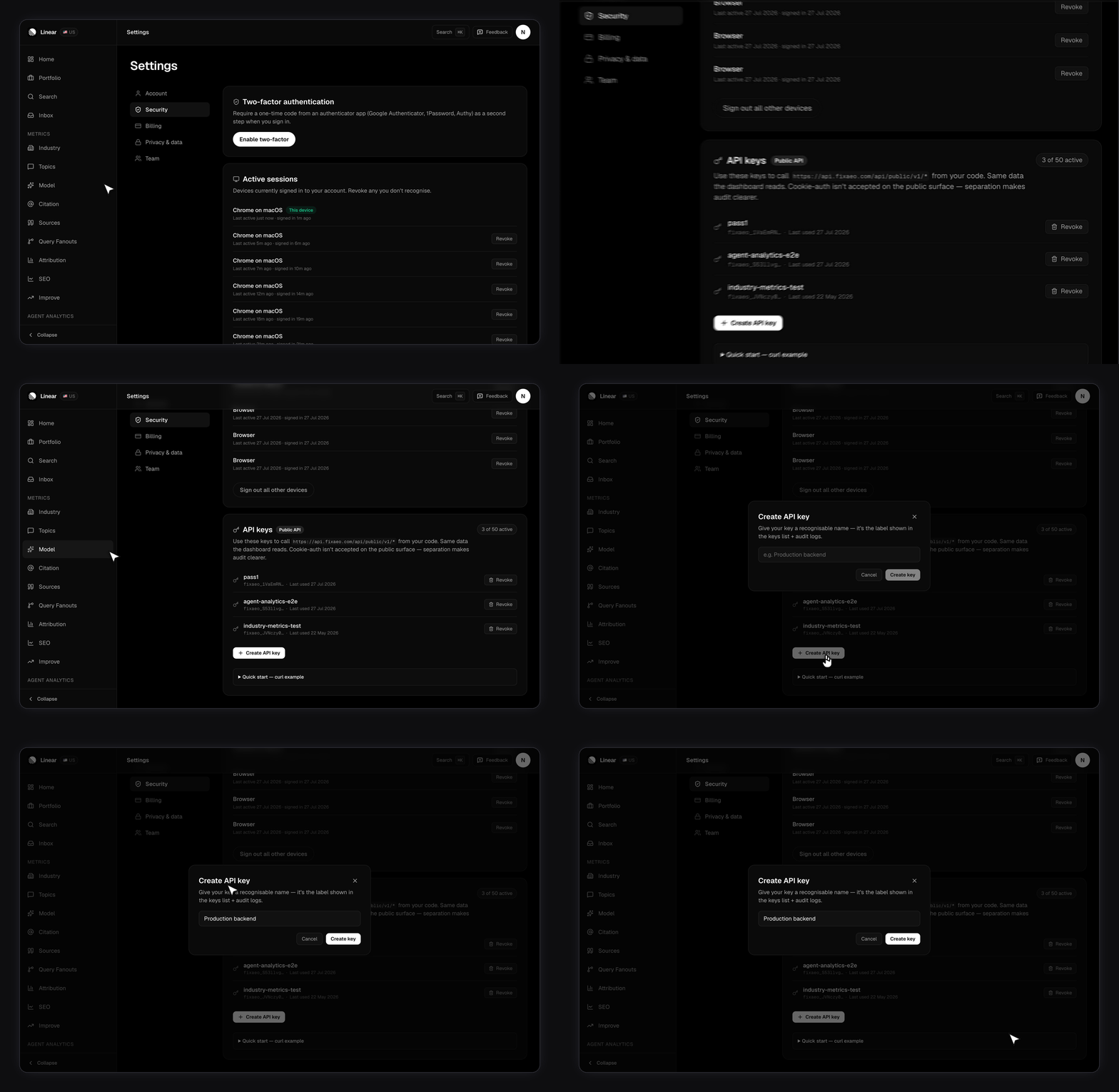
1
Open Settings, then Security
Go to fixaeo.com/app/settings#security. The API keys card sits below two-factor and your active sessions.
2
Click Create API key
Give it a name you’ll recognise later —
warehouse-sync, grafana, staging. Names are trimmed to 80 characters. An empty name is rejected with 400 name required.3
Copy the key before you close the dialog
This is the only time the full key is shown. Paste it straight into your secret store.
Only the SHA-256 hash of your key is stored, so nobody at FixAEO can read it back to you. If you lose the plaintext, revoke the key and create a new one.
What does a key look like?
fixaeo_ followed by 32 random bytes in URL-safe base64. That’s about 50 characters in total.
fixaeo_ prefix is there so a leaked key is greppable in logs and catchable by secret scanners. In the keys list the app shows only the first 14 characters plus an ellipsis, which is enough to tell two keys apart without revealing anything useful.
How many keys can you have?
Your plan sets the cap. Settings shows it live as an X of N active chip, and the Create button greys out once you’re at the limit. Free accounts get one. Hit the cap through the API and you get402:
If that chip shows a lower cap than your paid plan should give you, email billing@fixaeo.com. The key cap reads a different plan field from the rest of the product, so it can lag behind a recent upgrade.
What does a bad key return?
Always401, always JSON, always a single error string.
Unknown and revoked deliberately share a message. Telling them apart would let someone probing keys learn which strings ever existed.
How do you rotate or revoke?
Create the replacement first, deploy it, then revoke the old one. Revocation takes effect on the next request — anything still sending the old key starts getting401 invalid API key immediately.
Each key records a last used timestamp, shown on its row in Settings. That’s the fastest way to check a key is genuinely dead before you delete the integration that held it.
Revoked keys stay listed with their revocation date rather than disappearing, so you keep an audit trail.
Can a key manage other keys?
No, and that’s on purpose. The three management endpoints live on the cookie-authenticated dashboard surface:GET /api/v1/me/api-keysPOST /api/v1/me/api-keysPOST /api/v1/me/api-keys/{id}/revoke
Keeping a key safe
- Store it server-side. It carries full read access to your workspace, so it never belongs in browser or mobile code.
- Use one key per integration. Then revoking a compromised one doesn’t take down everything else.
- Rotate on staff changes rather than on a calendar. That’s when keys actually leak.
Next
Rate limits
What happens when you call too fast, and how to back off.
Filters and time ranges
Shared query parameters and their accepted values.
Customer API
Base URL, the 21 paths, and the plan gates.
Security
How FixAEO handles your data more broadly.