> ## Documentation Index
> Fetch the complete documentation index at: https://docs.fixaeo.com/llms.txt
> Use this file to discover all available pages before exploring further.
# Topics and labels
> Two ways to group a prompt list that's outgrown one screen.
Topics and labels are how you slice a prompt list once it's too big to read line by line.
Topics are themes. Labels are tags you define yourself. They're separate systems, and FixAEO uses the word "topic" for two related things, so it's worth ten seconds to get them straight.
## The two kinds of topics
**Setup topics** are the themes you picked during setup. FixAEO suggests up to ten from your brand profile, pre-selects five, and lets you type your own. They exist to steer prompt generation. Once your prompts are written, their job is done.
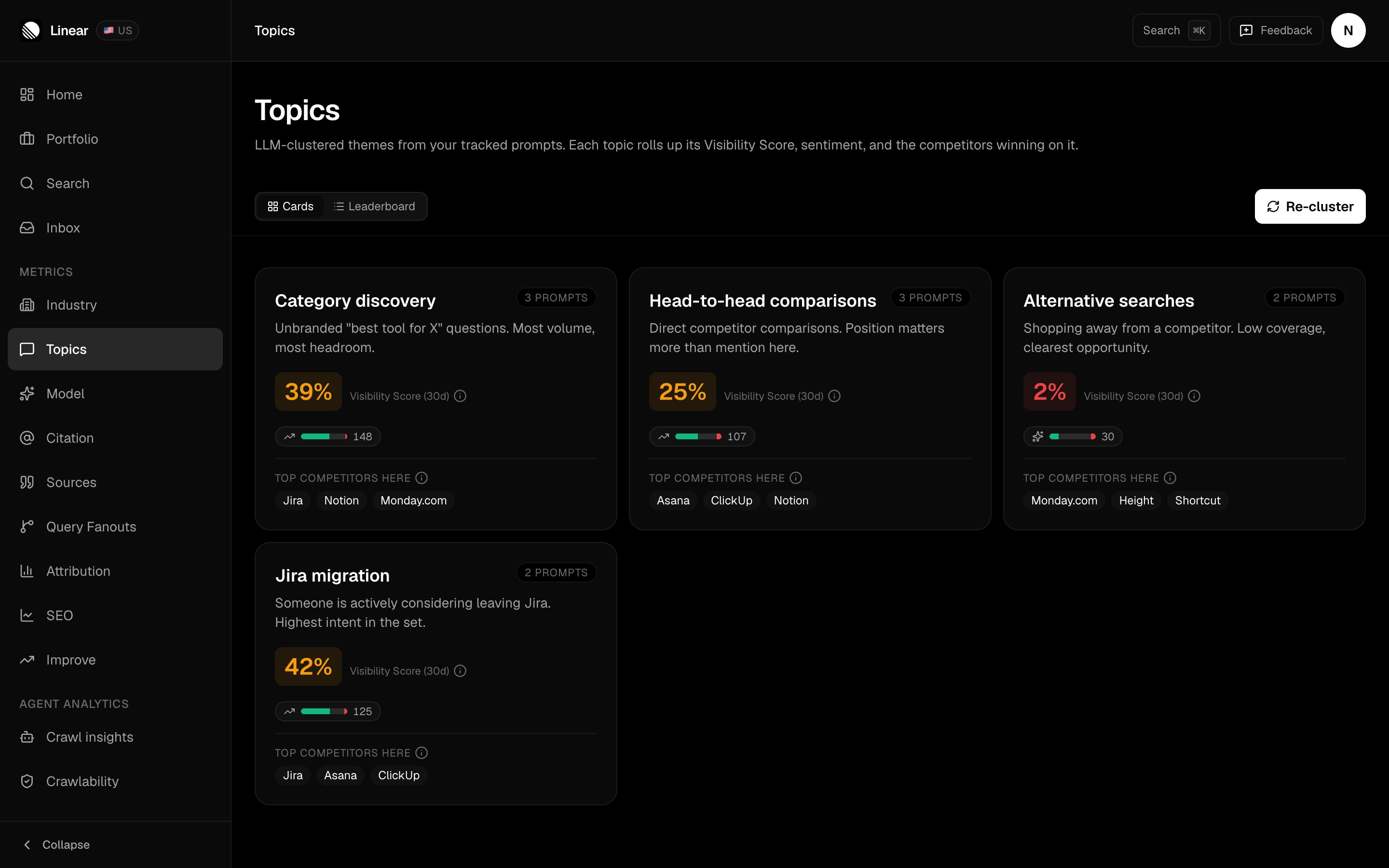
**Topic clusters** are what you see on the Topics page. FixAEO groups your tracked prompts into themes, then reports performance for each theme.
These aren't the same list, and they can drift apart. You might pick "pricing" during setup, then add ten prompts about migrations, and the clusters will grow a migration theme you never named.
That drift is visible in the clusters themselves:
 ## The Topics page
Each cluster tile shows its [Visibility Score](/metrics/visibility-score), its sentiment, and which competitors are winning on it. Two views:
* **Cards** — the default, richer per topic.
* **Leaderboard** — a ranked table, better when you have a lot of clusters.
## The Topics page
Each cluster tile shows its [Visibility Score](/metrics/visibility-score), its sentiment, and which competitors are winning on it. Two views:
* **Cards** — the default, richer per topic.
* **Leaderboard** — a ranked table, better when you have a lot of clusters.
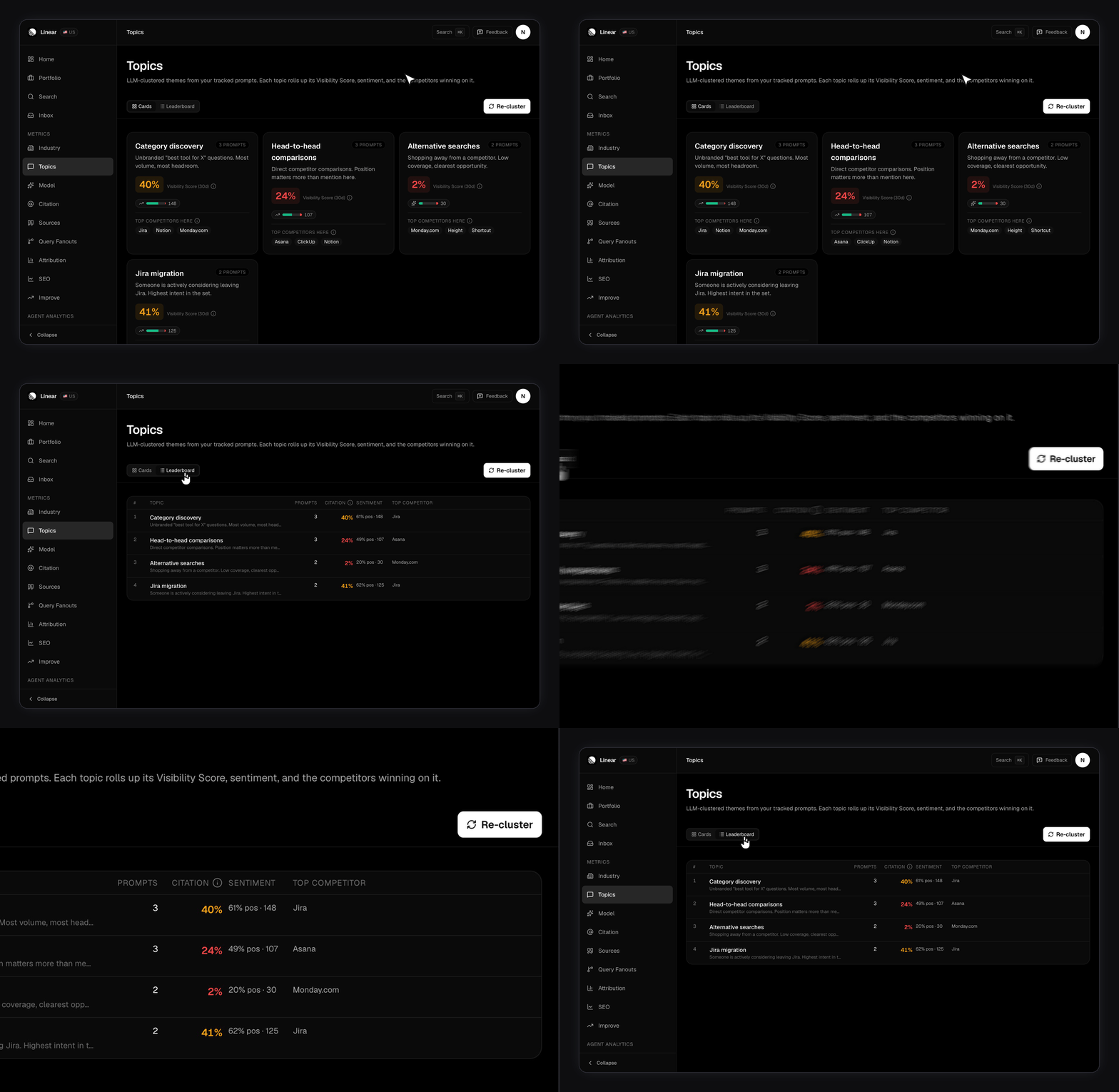 Click any topic to open a panel with per-engine detail.
Clusters don't regroup themselves on every page load. Press **Re-cluster** to force a fresh pass, which takes a few seconds. FixAEO also refreshes stale clusters on its own.
Re-cluster after you add a batch of prompts. Otherwise your new prompts sit in whatever theme the old grouping had room for, and the tiles read as stale.
## Labels: tags and personas
Labels are your own vocabulary, applied to prompts. There are two kinds, stored the same way but used for different cuts:
* **Tags** describe intent. Examples: awareness, purchase intent, support.
* **Personas** describe audience. Examples: startup founder, enterprise buyer.
Create and delete both from the Labels card in your brand settings. Give each one a color so it's readable at a glance.
Labels are your own vocabulary, so build the set you'd actually cut your results by before you start applying them. Once a label is in use, it shows up in the filter dropdowns on the [Citation page](/citations) beside topics, engines, and regions.
## A play: find where the category talks without you
Here's a concrete use for topic clusters. It takes about five minutes.
Switch from Cards to Leaderboard so you can read every cluster at once.
Your weakest clusters are the themes where AI models answer your category's questions and don't name you. That's the gap.
A cluster full of prompts that name you will score high and tell you nothing about reach. The interesting rows are the non-branded ones. See [Setting up your prompts](/setting-up-prompts) for the difference.
Open a weak cluster and read the competitors listed on it. Then go to [Citations](/citations) and filter by that topic to see which domains the models cited when they answered.
You now have a theme you're losing, the brands beating you, and the specific pages the models trusted. That's a content brief.
## How do you keep a growing list organized?
* Keep your topic count modest. Ten broad themes read better than thirty narrow ones.
* Re-cluster after every batch of new prompts, not every day.
* When a cluster's name surprises you, that's a signal, not a bug. Your prompt list has drifted from your brand profile.
* If a theme matters and no cluster covers it, the fix is more prompts, not more topics.
## Related
* [Setting up your prompts](/setting-up-prompts) — what to feed the clusters.
* [Your brand profile](/brand-profile) — the upstream context for topic suggestions.
* [Tracking competitors](/competitors) — who shows up in the themes you're losing.
Click any topic to open a panel with per-engine detail.
Clusters don't regroup themselves on every page load. Press **Re-cluster** to force a fresh pass, which takes a few seconds. FixAEO also refreshes stale clusters on its own.
Re-cluster after you add a batch of prompts. Otherwise your new prompts sit in whatever theme the old grouping had room for, and the tiles read as stale.
## Labels: tags and personas
Labels are your own vocabulary, applied to prompts. There are two kinds, stored the same way but used for different cuts:
* **Tags** describe intent. Examples: awareness, purchase intent, support.
* **Personas** describe audience. Examples: startup founder, enterprise buyer.
Create and delete both from the Labels card in your brand settings. Give each one a color so it's readable at a glance.
Labels are your own vocabulary, so build the set you'd actually cut your results by before you start applying them. Once a label is in use, it shows up in the filter dropdowns on the [Citation page](/citations) beside topics, engines, and regions.
## A play: find where the category talks without you
Here's a concrete use for topic clusters. It takes about five minutes.
Switch from Cards to Leaderboard so you can read every cluster at once.
Your weakest clusters are the themes where AI models answer your category's questions and don't name you. That's the gap.
A cluster full of prompts that name you will score high and tell you nothing about reach. The interesting rows are the non-branded ones. See [Setting up your prompts](/setting-up-prompts) for the difference.
Open a weak cluster and read the competitors listed on it. Then go to [Citations](/citations) and filter by that topic to see which domains the models cited when they answered.
You now have a theme you're losing, the brands beating you, and the specific pages the models trusted. That's a content brief.
## How do you keep a growing list organized?
* Keep your topic count modest. Ten broad themes read better than thirty narrow ones.
* Re-cluster after every batch of new prompts, not every day.
* When a cluster's name surprises you, that's a signal, not a bug. Your prompt list has drifted from your brand profile.
* If a theme matters and no cluster covers it, the fix is more prompts, not more topics.
## Related
* [Setting up your prompts](/setting-up-prompts) — what to feed the clusters.
* [Your brand profile](/brand-profile) — the upstream context for topic suggestions.
* [Tracking competitors](/competitors) — who shows up in the themes you're losing.