> ## Documentation Index
> Fetch the complete documentation index at: https://docs.fixaeo.com/llms.txt
> Use this file to discover all available pages before exploring further.
# Plans and limits
> What each plan includes, and how the shared prompt pool works.
Four plans, four sets of limits. Here are the exact numbers.
Your plan controls four things. How many brands you can track, how many prompts you can run, which AI engines answer them, and how often FixAEO rescans. Everything else in the product works the same on every tier.
## The plan matrix
| Plan | Brands | Tracked prompts | Engines scanned | Rescan frequency |
| ---------- | ------ | --------------- | --------------- | ------------------ |
| Free | 1 | 3 | None | No scheduled scans |
| Lite | 2 | 15 | 6 | Every 72 hours |
| Growth | 5 | 50 | 6 | Daily |
| Enterprise | 10 | 500 | 9 | Every 6 hours |
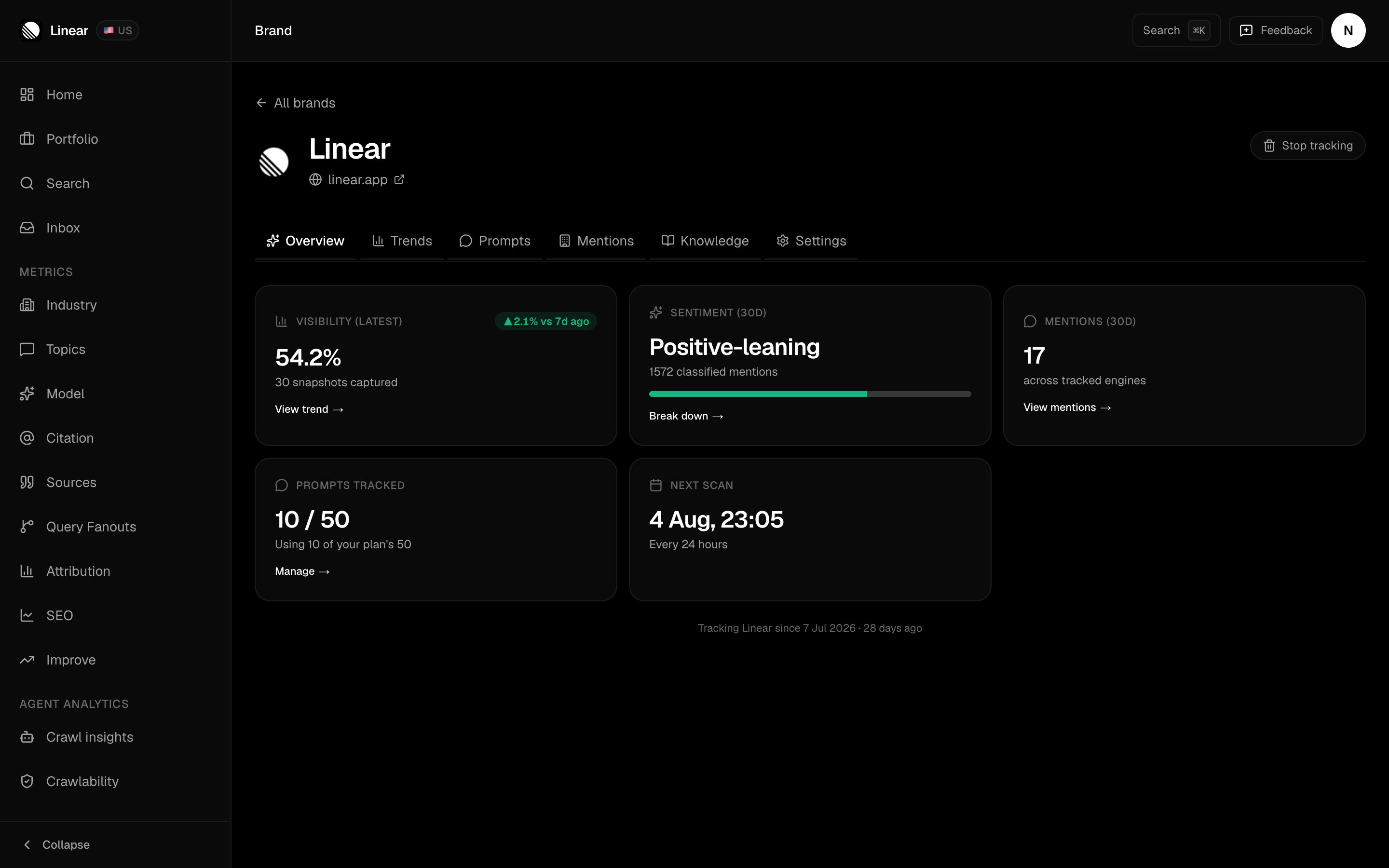
Two of those columns are reported back to you on each brand's Overview tab.
 Scan region isn't a plan limit. Every brand has exactly one, on every tier — the country you pick during setup, which FixAEO localizes your prompts to. See [Your brand profile](/brand-profile).
Pricing lives at [fixaeo.com/pricing](https://fixaeo.com/pricing). Dollar figures stay off this page so they can't go stale here.
## How does the shared prompt pool work?
This is the limit people misread, so it's worth stating plainly: **tracked prompts are a shared account-wide pool, not a per-brand allowance.**
On Lite you get 15 prompts in total. Not 15 per brand. Track two brands and you split those 15 between them — say 9 on your main brand and 6 on the second.
Because the pool is shared, a new brand needs prompt room left in it. If your first brand is using the full allowance, free some up on [Setting up your prompts](/setting-up-prompts) before you add the second one.
Brand caps work the other way round — they're independent. Adding a brand never grants you extra prompts.
## Which engines does each plan scan?
Lite and Growth scan the same six:
ChatGPT, Gemini, Perplexity, Copilot, AI Overviews, and AI Mode.
Enterprise scans all nine — those six plus **Claude**, **Grok**, and **DeepSeek**. Those three cost more to run, which is why they sit on the top tier.
Any filter that lists engines, like the Platforms dropdown on [Citations](/citations), only offers the engines your plan scans. You won't see a Claude option on Lite.
## What do you get on the free plan?
The whole product, minus the scans.
You can sign in, finish setup, add a brand, and pick prompts. Scheduled scans only run for paying accounts, so no answers get captured and your numbers stay empty. FixAEO routes free accounts to the upgrade page rather than leaving you waiting for data that isn't coming.
Setting up your first brand saves up to 15 prompts no matter which plan you're on, so nothing you picked during setup is thrown away. Adding more later is capped at your plan's number.
## Can the limits be changed?
Every number in the table is a default, not a hard ceiling. Brand caps, prompt caps, engine sets, and scan frequency can all be raised for your account.
When you hit your brand cap, the Brands page shows a **Talk to sales** card. That's the fastest route. You can also email [nitish@fixaeo.com](mailto:nitish@fixaeo.com).
## Your current plan and billing
Settings, then Billing. It shows your tier, your status (active, trialing, cancelling, or paused), and your renewal date, plus your invoice history with a download link on each row. You can switch between monthly and annual billing there, pause billing, or cancel.
If you cancel, access continues until the end of the period you've already paid for.
Scan frequency is the limit most people underrate. Growth rescans daily, Lite every three days. If you're shipping content and want to see the effect this week rather than next, that gap matters more than the prompt count.
## Related
Adding, switching, and removing brands against your cap.
How to spend your prompt pool well.
From sign-in to your first scan.
What one scan actually captures.
Scan region isn't a plan limit. Every brand has exactly one, on every tier — the country you pick during setup, which FixAEO localizes your prompts to. See [Your brand profile](/brand-profile).
Pricing lives at [fixaeo.com/pricing](https://fixaeo.com/pricing). Dollar figures stay off this page so they can't go stale here.
## How does the shared prompt pool work?
This is the limit people misread, so it's worth stating plainly: **tracked prompts are a shared account-wide pool, not a per-brand allowance.**
On Lite you get 15 prompts in total. Not 15 per brand. Track two brands and you split those 15 between them — say 9 on your main brand and 6 on the second.
Because the pool is shared, a new brand needs prompt room left in it. If your first brand is using the full allowance, free some up on [Setting up your prompts](/setting-up-prompts) before you add the second one.
Brand caps work the other way round — they're independent. Adding a brand never grants you extra prompts.
## Which engines does each plan scan?
Lite and Growth scan the same six:
ChatGPT, Gemini, Perplexity, Copilot, AI Overviews, and AI Mode.
Enterprise scans all nine — those six plus **Claude**, **Grok**, and **DeepSeek**. Those three cost more to run, which is why they sit on the top tier.
Any filter that lists engines, like the Platforms dropdown on [Citations](/citations), only offers the engines your plan scans. You won't see a Claude option on Lite.
## What do you get on the free plan?
The whole product, minus the scans.
You can sign in, finish setup, add a brand, and pick prompts. Scheduled scans only run for paying accounts, so no answers get captured and your numbers stay empty. FixAEO routes free accounts to the upgrade page rather than leaving you waiting for data that isn't coming.
Setting up your first brand saves up to 15 prompts no matter which plan you're on, so nothing you picked during setup is thrown away. Adding more later is capped at your plan's number.
## Can the limits be changed?
Every number in the table is a default, not a hard ceiling. Brand caps, prompt caps, engine sets, and scan frequency can all be raised for your account.
When you hit your brand cap, the Brands page shows a **Talk to sales** card. That's the fastest route. You can also email [nitish@fixaeo.com](mailto:nitish@fixaeo.com).
## Your current plan and billing
Settings, then Billing. It shows your tier, your status (active, trialing, cancelling, or paused), and your renewal date, plus your invoice history with a download link on each row. You can switch between monthly and annual billing there, pause billing, or cancel.
If you cancel, access continues until the end of the period you've already paid for.
Scan frequency is the limit most people underrate. Growth rescans daily, Lite every three days. If you're shipping content and want to see the effect this week rather than next, that gap matters more than the prompt count.
## Related
Adding, switching, and removing brands against your cap.
How to spend your prompt pool well.
From sign-in to your first scan.
What one scan actually captures.