> ## Documentation Index
> Fetch the complete documentation index at: https://docs.fixaeo.com/llms.txt
> Use this file to discover all available pages before exploring further.
# Google Analytics
> Tie AI referral traffic to sessions, conversions, and revenue.
Connect GA4 to find out whether AI traffic actually converts.
The Google Analytics integration reads your GA4 property and pulls out the sessions that arrived from an AI assistant. FixAEO then reports those sessions, the conversions they drove, and the revenue behind them — broken down by engine and by landing page.
 ## Connect it
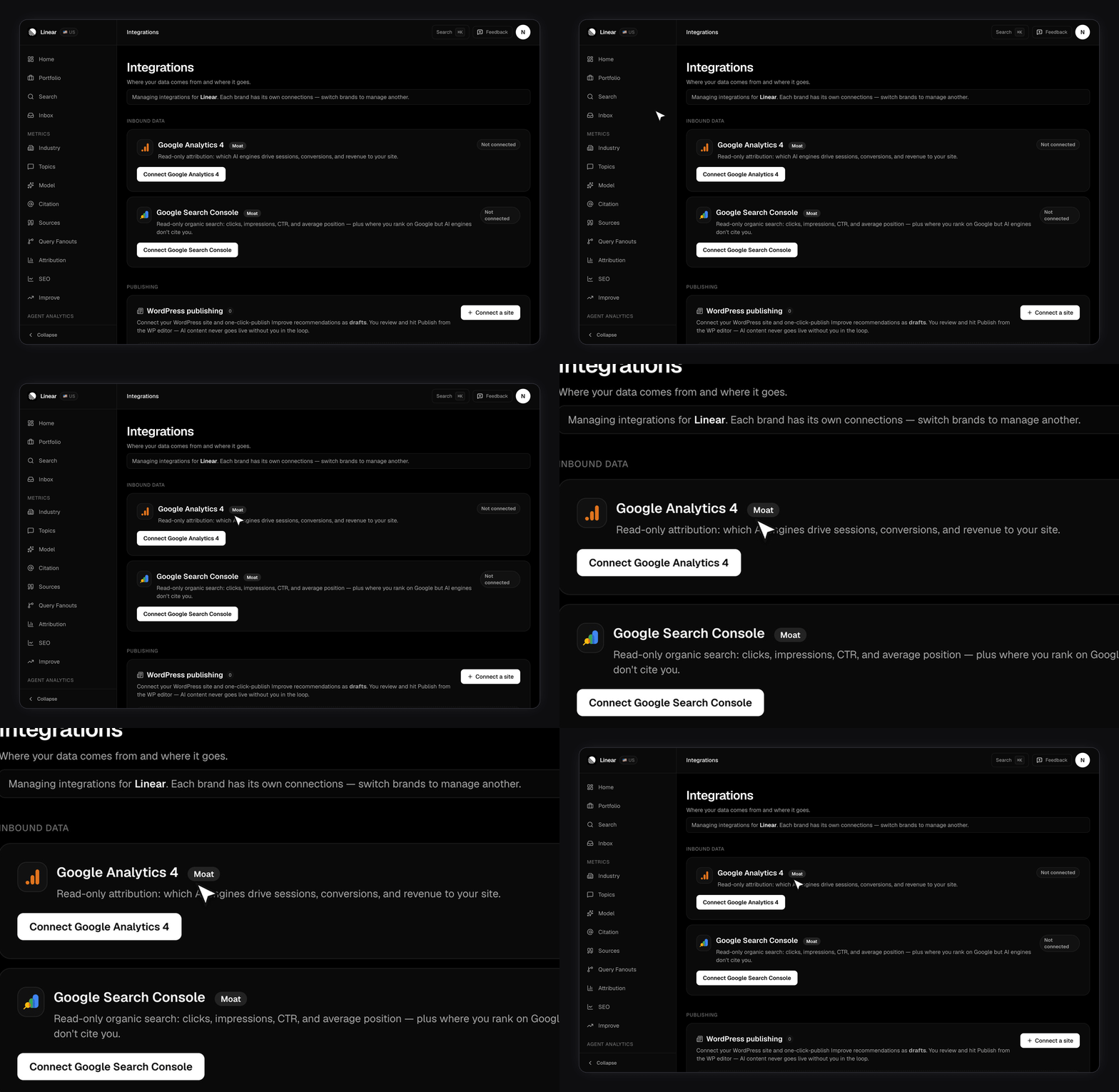
Find the Google Analytics 4 card and click Connect.
FixAEO asks Google for read-only analytics access. It can't change your property, your events, or your goals.
Google returns every GA4 property you can see. Choose the one that matches this brand's website.
Connecting requires a paid plan. If your GA4 lives on a different Google account, or a Workspace admin owns it, the card walks you through those cases directly. See [Plans and limits](/plans-and-limits) for what your tier includes.
## How does FixAEO decide a session came from AI?
It reads GA4's `sessionSource` on every session and matches it against a fixed list of AI hostnames. A match tags the session with an engine:
| Engine | Matched sources |
| ---------- | -------------------------------------- |
| ChatGPT | `chatgpt.com`, `openai` |
| Claude | `claude.ai`, `anthropic` |
| Perplexity | `perplexity.ai` |
| Copilot | `copilot.microsoft.com` |
| Gemini | `gemini.google.com`, `bard.google.com` |
| Grok | `grok.com`, `x.ai` and its subdomains |
| DeepSeek | `deepseek` |
| Meta AI | `meta.ai` |
Anything else is ignored. FixAEO pulls date, source, landing page, and country, then syncs hourly.
This measures clicks, not answers. Most AI answers never produce a click — the reader gets what they needed and moves on. Treat AI sessions as a floor on your real impact, not a total. [Visibility Score](/metrics/visibility-score) measures the part that never shows up in analytics.
## What you get
**Attribution page.** Three tiles for AI sessions, AI conversions, and AI revenue, with a chart you can switch between all three. Below that, a per-engine bar chart and your top landing pages. Revenue uses your GA4 property's own reporting currency.
**Dashboard card.** Once connected, an AI attribution snapshot appears on your [dashboard](/dashboard) alongside your visibility numbers.
**Industry overlay.** [Industry benchmarks](/industry) can overlay GA4 traffic on the share-of-voice chart, so you can see whether a share gain moved anything real.
Until you connect, the Attribution page shows a connect prompt rather than empty charts.
## Reading the landing pages report
The landing page list is the most actionable part. It tells you which of your pages AI assistants are sending people to, which is usually a shorter list than you'd guess.
Cross-reference the top AI landing pages against [Sources](/sources). A page that AI engines both cite and send traffic to is your strongest asset in the category. Update it before you write anything new.
## Disconnecting
Disconnecting stops the hourly sync. Data already pulled stays where it is. You can reconnect or switch to a different property at any time from the same card.
## Related pages
* [Google Search Console](/integrations/google-search-console) — the ranking half, plus the rank-but-not-cited gap
* [Agent analytics](/agent-analytics) — AI crawlers hitting your site, which GA4 can't see
* [Metrics overview](/metrics-overview) — how every FixAEO number is defined
## Connect it
Find the Google Analytics 4 card and click Connect.
FixAEO asks Google for read-only analytics access. It can't change your property, your events, or your goals.
Google returns every GA4 property you can see. Choose the one that matches this brand's website.
Connecting requires a paid plan. If your GA4 lives on a different Google account, or a Workspace admin owns it, the card walks you through those cases directly. See [Plans and limits](/plans-and-limits) for what your tier includes.
## How does FixAEO decide a session came from AI?
It reads GA4's `sessionSource` on every session and matches it against a fixed list of AI hostnames. A match tags the session with an engine:
| Engine | Matched sources |
| ---------- | -------------------------------------- |
| ChatGPT | `chatgpt.com`, `openai` |
| Claude | `claude.ai`, `anthropic` |
| Perplexity | `perplexity.ai` |
| Copilot | `copilot.microsoft.com` |
| Gemini | `gemini.google.com`, `bard.google.com` |
| Grok | `grok.com`, `x.ai` and its subdomains |
| DeepSeek | `deepseek` |
| Meta AI | `meta.ai` |
Anything else is ignored. FixAEO pulls date, source, landing page, and country, then syncs hourly.
This measures clicks, not answers. Most AI answers never produce a click — the reader gets what they needed and moves on. Treat AI sessions as a floor on your real impact, not a total. [Visibility Score](/metrics/visibility-score) measures the part that never shows up in analytics.
## What you get
**Attribution page.** Three tiles for AI sessions, AI conversions, and AI revenue, with a chart you can switch between all three. Below that, a per-engine bar chart and your top landing pages. Revenue uses your GA4 property's own reporting currency.
**Dashboard card.** Once connected, an AI attribution snapshot appears on your [dashboard](/dashboard) alongside your visibility numbers.
**Industry overlay.** [Industry benchmarks](/industry) can overlay GA4 traffic on the share-of-voice chart, so you can see whether a share gain moved anything real.
Until you connect, the Attribution page shows a connect prompt rather than empty charts.
## Reading the landing pages report
The landing page list is the most actionable part. It tells you which of your pages AI assistants are sending people to, which is usually a shorter list than you'd guess.
Cross-reference the top AI landing pages against [Sources](/sources). A page that AI engines both cite and send traffic to is your strongest asset in the category. Update it before you write anything new.
## Disconnecting
Disconnecting stops the hourly sync. Data already pulled stays where it is. You can reconnect or switch to a different property at any time from the same card.
## Related pages
* [Google Search Console](/integrations/google-search-console) — the ranking half, plus the rank-but-not-cited gap
* [Agent analytics](/agent-analytics) — AI crawlers hitting your site, which GA4 can't see
* [Metrics overview](/metrics-overview) — how every FixAEO number is defined