> ## Documentation Index
> Fetch the complete documentation index at: https://docs.fixaeo.com/llms.txt
> Use this file to discover all available pages before exploring further.
# Improve
> Turn your scan data into a short list of fixes you can ship.
Improve reads your own numbers and hands back a ranked list of things to do about them.
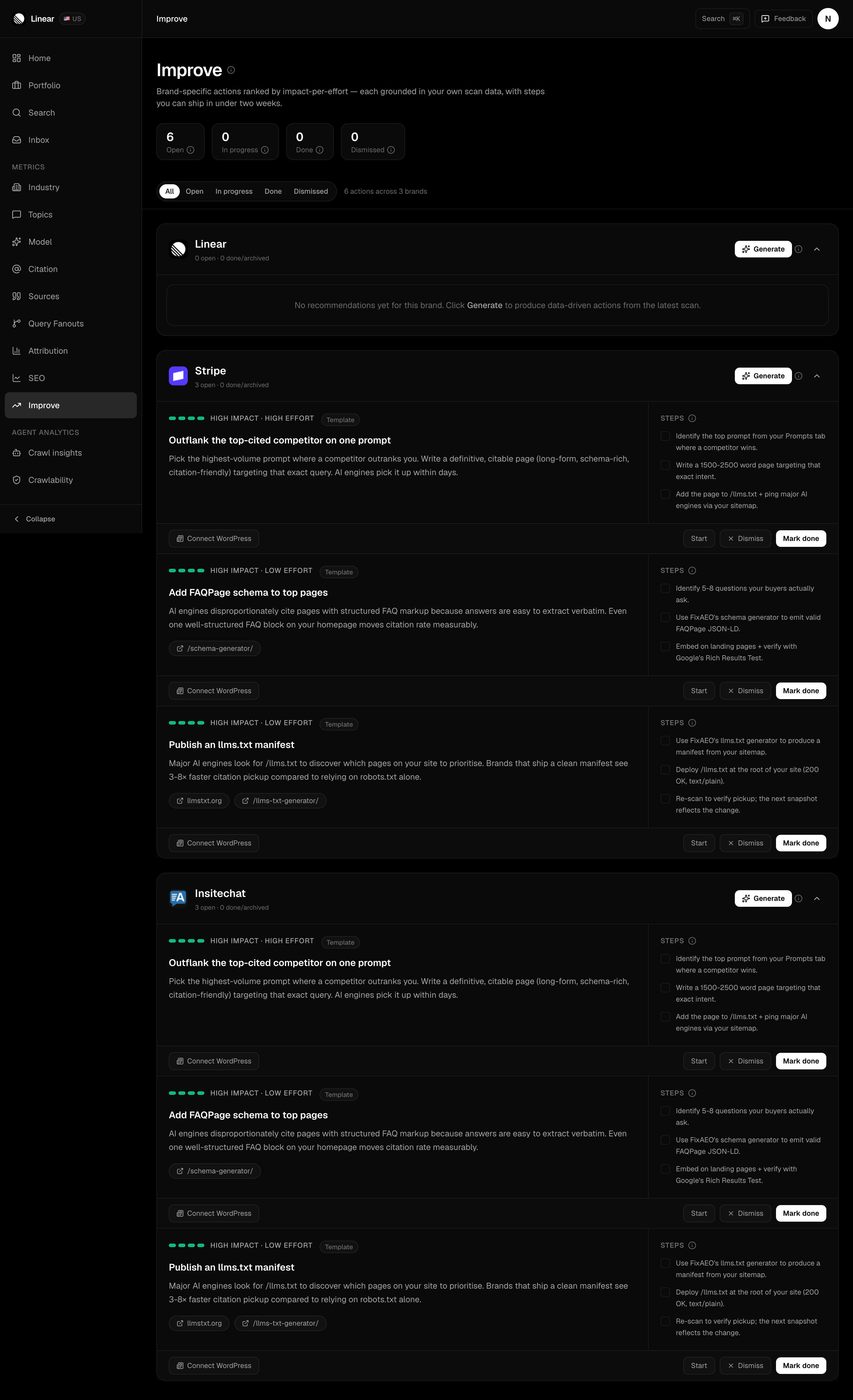
Improve is a per-brand action board. An LLM reads a brand's recent scan data and writes up to five concrete recommendations. Each one carries a rationale, an impact rating, an effort rating, and a short checklist of steps. You mark them off as you ship them.
## How does Improve build a recommendation?
Open **Improve** in the sidebar. Every brand you track gets its own block with a **Generate** button. Clicking it sends that brand's data to one AI provider and waits for the answer, which takes a few seconds.
What goes into that request:
* Brand name, domain, and industry
* Current [Visibility Score](/metrics/visibility-score) and the change across the window
* Visibility Score broken out per engine, so the model can spot one weak engine
* The domains AI engines already cite for your brand, from [Citations](/citations)
* Your Knowledge Base, if you've filled in the **Knowledge** tab on your brand page
The window is the last 30 days, scoped to the brand's primary region.
These recommendations are written by an LLM. They're grounded in numbers you can see elsewhere in the app, but they're suggestions, not guarantees. Read them before you act.
## What does a recommendation look like?
Every card has the same anatomy: a short imperative headline, one to three sentences of rationale, an impact rating, an effort rating, and three steps.
The rationale quotes your own numbers, in lines like "Claude cites you at 12% vs ChatGPT 45% — fix the gap by...". Where you've filled in a Knowledge Base, the wording comes from yours rather than from invented claims. Every action is meant to be doable by two people in under two weeks — if a card reads like a quarter of work, treat that as a sign to split it.
Cards carry one of two badges. **From your data** means the LLM ran on your brand. **Template** means it didn't return usable output, so you got a curated starter action instead. There are three of those, and they're good first moves for any brand: publish an `llms.txt` manifest, add FAQPage schema to your top pages, and outflank the top-cited competitor on one prompt.
 ## Working the board
Four statuses, shown as counts at the top of the page and as filter pills below them.
## Working the board
Four statuses, shown as counts at the top of the page and as filter pills below them.
 | Status | How you get there |
| ----------- | -------------------------------------------------------------------------------------------------------------- |
| Open | Where every new card lands |
| In progress | Click **Start** |
| Done | Click **Mark done**. The card dims but stays visible |
| Dismissed | Click **Dismiss**. The card leaves the default board, and the **Dismissed** filter lists what you've set aside |
The tick boxes next to each step are a scratchpad for working through a card in one sitting, not a saved record of progress. The card's status is what carries across sessions.
## Does Improve refresh on its own?
Yes. FixAEO regenerates recommendations in the background for brands with real scan data, so the board stays current even for a brand you haven't opened in a while.
Pressing **Generate** yourself adds to the board rather than replacing it, and you won't collect duplicates of a card you're already working on.
## Turning a card into a draft
If you've connected a WordPress site, each card gets a **Publish to WordPress** button. It creates a draft post from that recommendation and links you to the WordPress editor. Nothing goes live until you publish it there. See [WordPress](/integrations/wordpress).
## Why is my board empty?
Improve needs scan data to reason about. A brand with no completed scans gives the model nothing to say.
* No brands yet? Start at [Your brand profile](/brand-profile).
* Brands but no scans? Scheduled scans start on a paid plan. See [Plans and limits](/plans-and-limits).
* Want sharper cards? Fill in the Knowledge tab. Advice grounded in your real products beats generic advice every time.
Once you've shipped a few actions, watch the effect on [your dashboard](/dashboard). Then set up [Alerts](/alerts) so you hear about the next drop without checking.
| Status | How you get there |
| ----------- | -------------------------------------------------------------------------------------------------------------- |
| Open | Where every new card lands |
| In progress | Click **Start** |
| Done | Click **Mark done**. The card dims but stays visible |
| Dismissed | Click **Dismiss**. The card leaves the default board, and the **Dismissed** filter lists what you've set aside |
The tick boxes next to each step are a scratchpad for working through a card in one sitting, not a saved record of progress. The card's status is what carries across sessions.
## Does Improve refresh on its own?
Yes. FixAEO regenerates recommendations in the background for brands with real scan data, so the board stays current even for a brand you haven't opened in a while.
Pressing **Generate** yourself adds to the board rather than replacing it, and you won't collect duplicates of a card you're already working on.
## Turning a card into a draft
If you've connected a WordPress site, each card gets a **Publish to WordPress** button. It creates a draft post from that recommendation and links you to the WordPress editor. Nothing goes live until you publish it there. See [WordPress](/integrations/wordpress).
## Why is my board empty?
Improve needs scan data to reason about. A brand with no completed scans gives the model nothing to say.
* No brands yet? Start at [Your brand profile](/brand-profile).
* Brands but no scans? Scheduled scans start on a paid plan. See [Plans and limits](/plans-and-limits).
* Want sharper cards? Fill in the Knowledge tab. Advice grounded in your real products beats generic advice every time.
Once you've shipped a few actions, watch the effect on [your dashboard](/dashboard). Then set up [Alerts](/alerts) so you hear about the next drop without checking.